Skip to content

Shop floor tracking for shops of 5 to 250 people

Know where every job on your floor is, right now.

FloorLine is shop floor software for small manufacturers. It tracks work orders through your shop as it happens: operators scan travelers on a tablet at each station, stock updates as jobs move, and the office sees what’s late before the customer calls.

No credit card. Keep the free plan when the trial ends.

Sound familiar?

Most shops find out a job is late when the customer calls.

FloorLine puts the work, the stations, and the stock in one place, and the floor keeps it current as people work.

  • The whiteboard says one thing and the floor says another.
  • Finding a job means walking the floor to look for its traveler.
  • Material runs out after the job has already started.
  • Nobody can say when an order will ship without asking three people.

What it does

From the first scan to the shipped order

The floor board is where it starts. Everything else stays current because the floor keeps it current.

Live floor board

See the whole floor from your desk

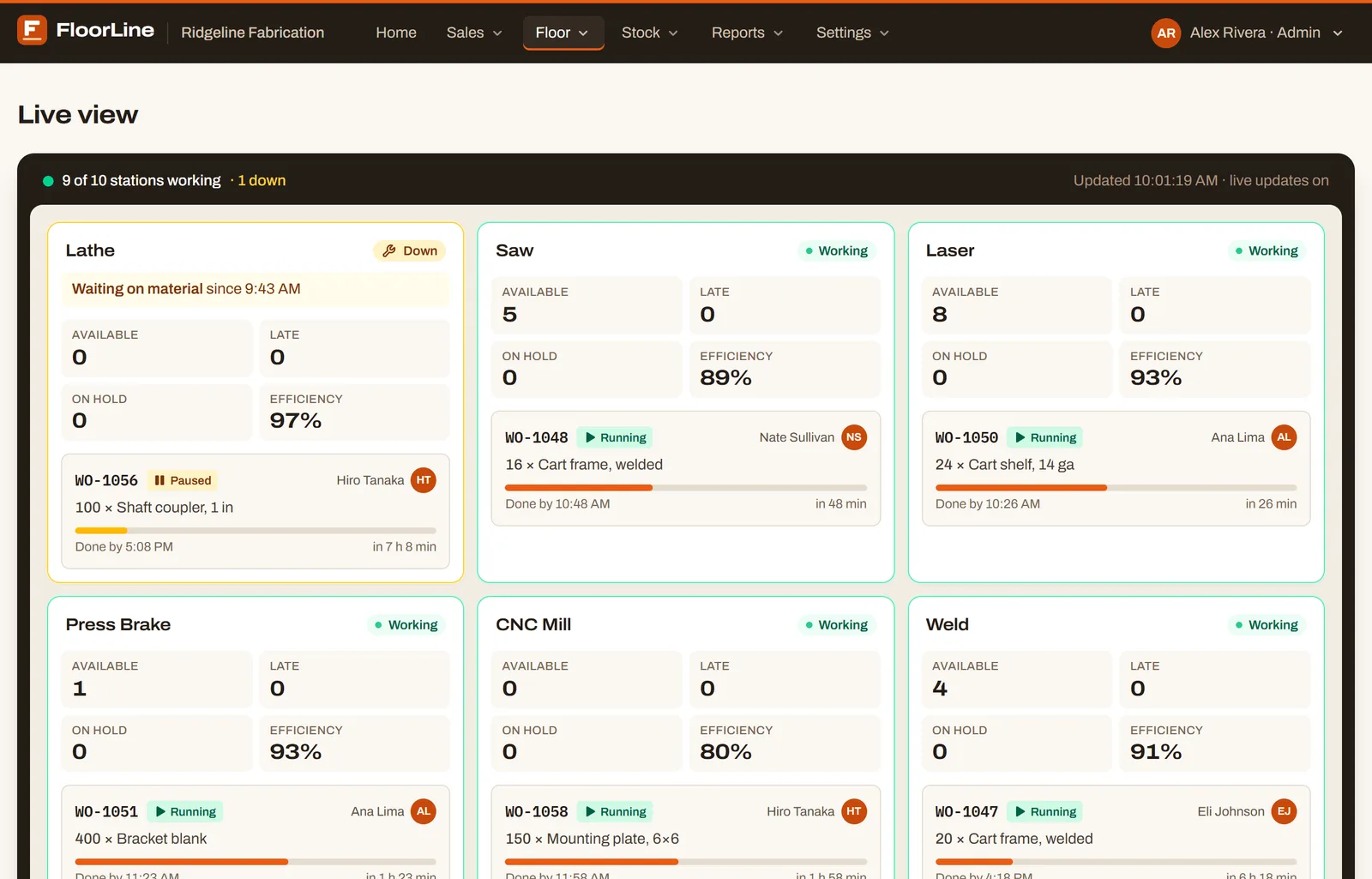
Every station on one screen: what’s running, who’s on it, what’s waiting, what’s late, and which stations are down. It changes the moment someone taps a tablet, so it works on the office TV too.

  • Running and paused jobs, with who’s working them
  • Estimated finish times and efficiency per station (Mid)
  • Down stations first, with the reason
  • A TV link for the shop wall, no sign-in
More about the live board
FloorLine’s Live view: a card for each station with the jobs running there, who started them, and counts of available, late, and on-hold work

Floor tablets

A tablet at every station

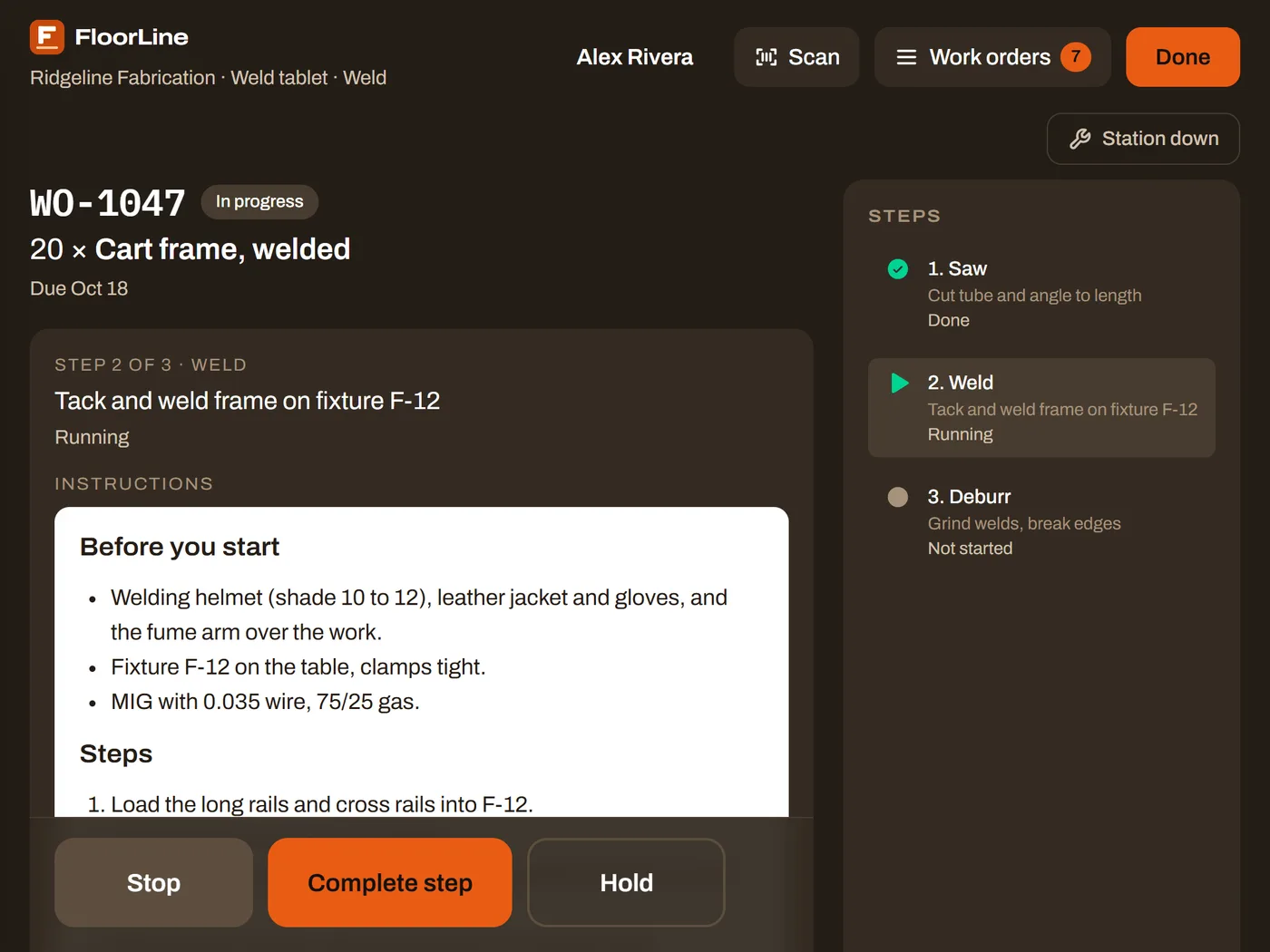
Operators tap their name, enter a PIN, and start, stop, or complete a step. Scanning the traveler with the tablet’s camera opens the job, with its instructions and checks right on the screen.

  • Keeps working when the Wi-Fi drops, and catches up after
  • Operators don’t need email accounts
  • Quality checks recorded before a step completes (Mid)
More about floor tablets
A FloorLine floor tablet with a welding step running: the work instructions, the list of steps, and big Stop, Complete step, and Hold buttons

Inventory

Stock that keeps itself

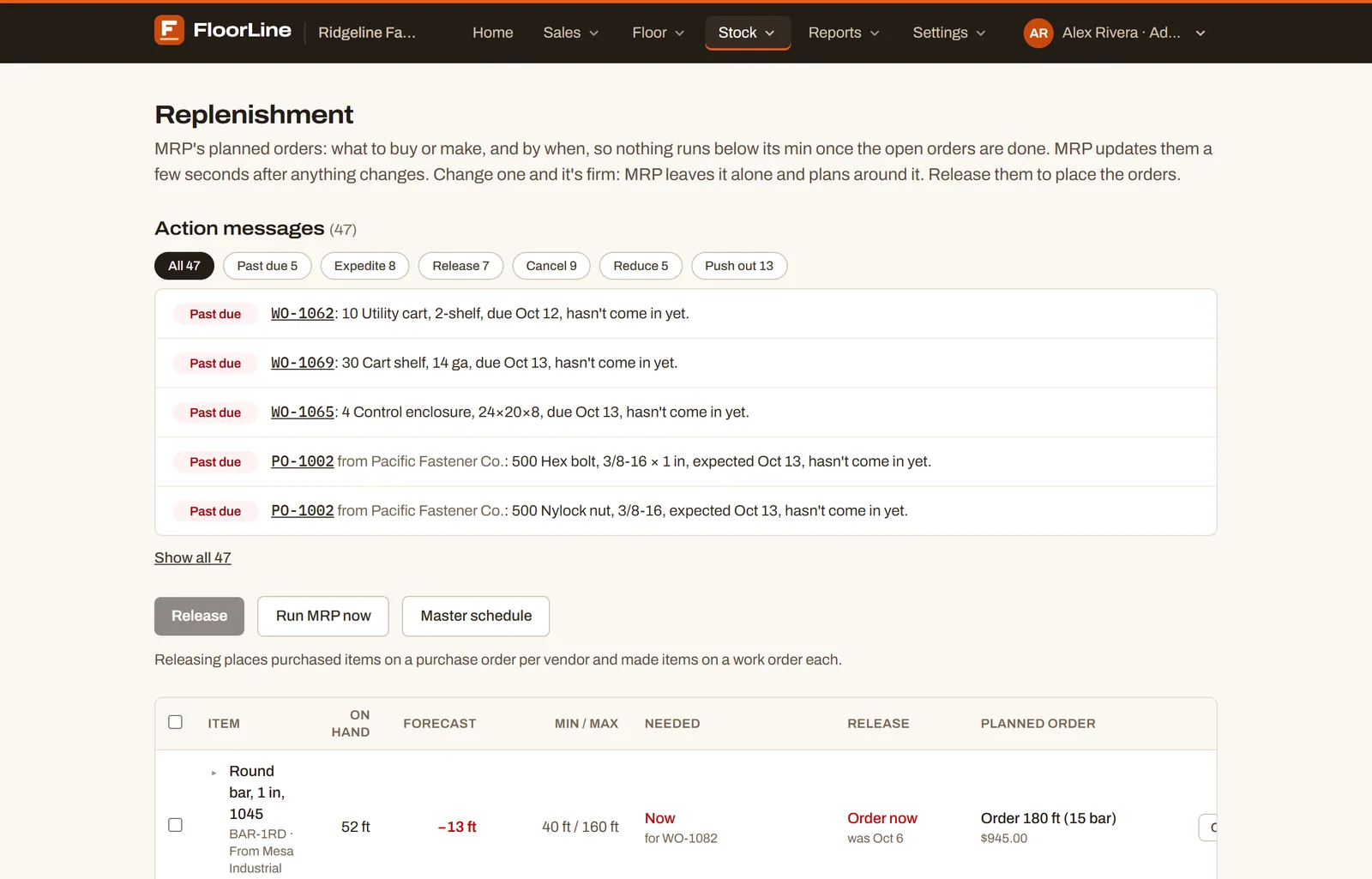
Materials come off the shelf when a step starts, and finished goods go on when the job completes. Replenishment tells you what to buy or make, how much, and by when.

  • Min and max reordering, with vendor packs and lead times (Basic)
  • MRP planned orders, action messages, and a master schedule (Mid)
  • Lots, serial numbers, and expiry dates (Mid)
More about inventory
FloorLine’s Replenishment page: action messages to expedite, release, or cancel orders, above planned orders with what to buy or make and when

Planning

A schedule that plans itself

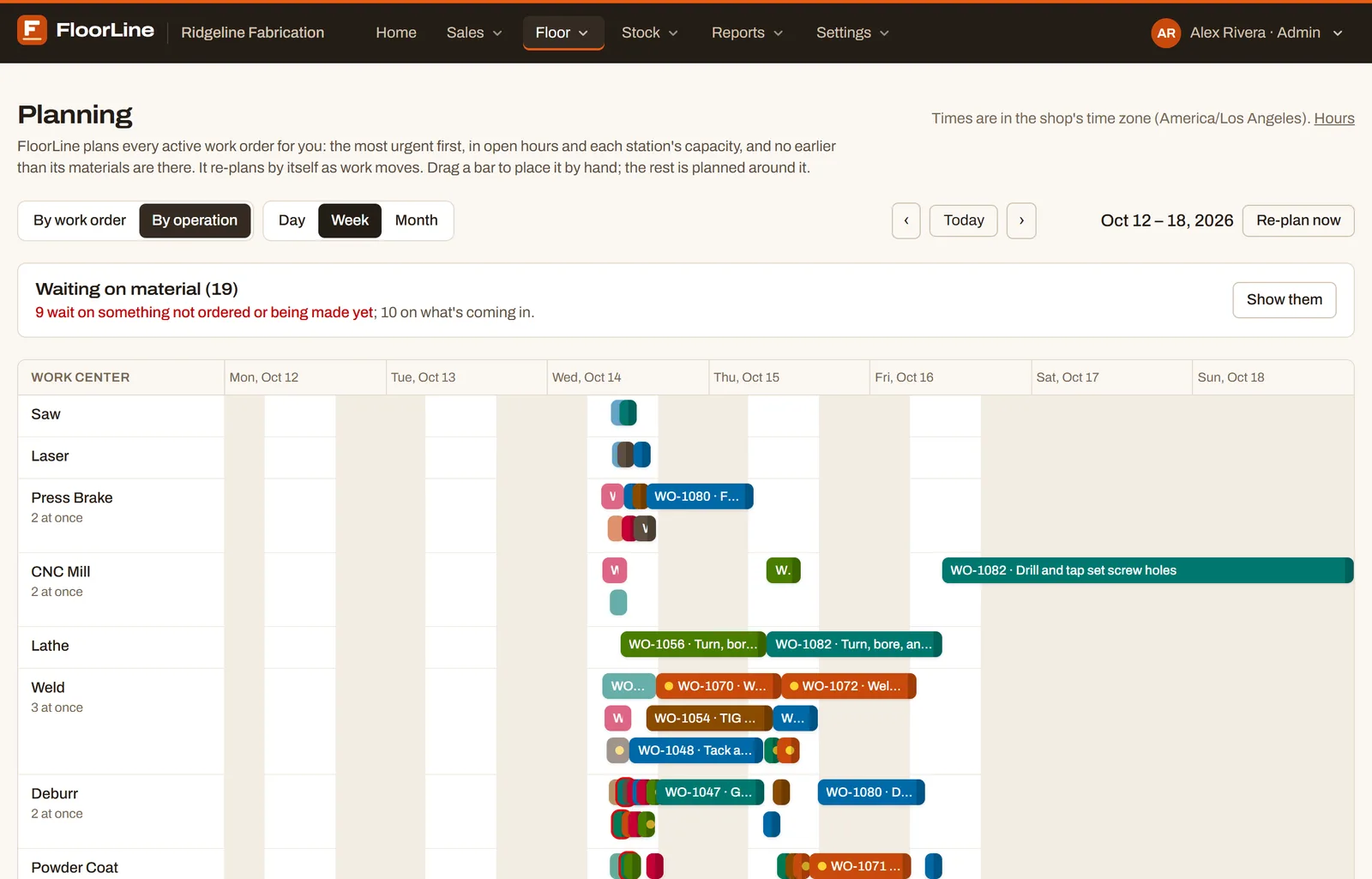
FloorLine schedules every open work order by urgency, around your hours, each station’s capacity, and when materials arrive, and plans again as work moves. Before you promise a date, it tells you when a new order could ship.

  • Drag a job to place it by hand; the rest plans around it
  • Scheduled maintenance keeps work off a station
  • On the Mid and High plans
FloorLine’s planning calendar by operation: a row for each station, with work orders scheduled across the week

Reports

Numbers straight from the floor

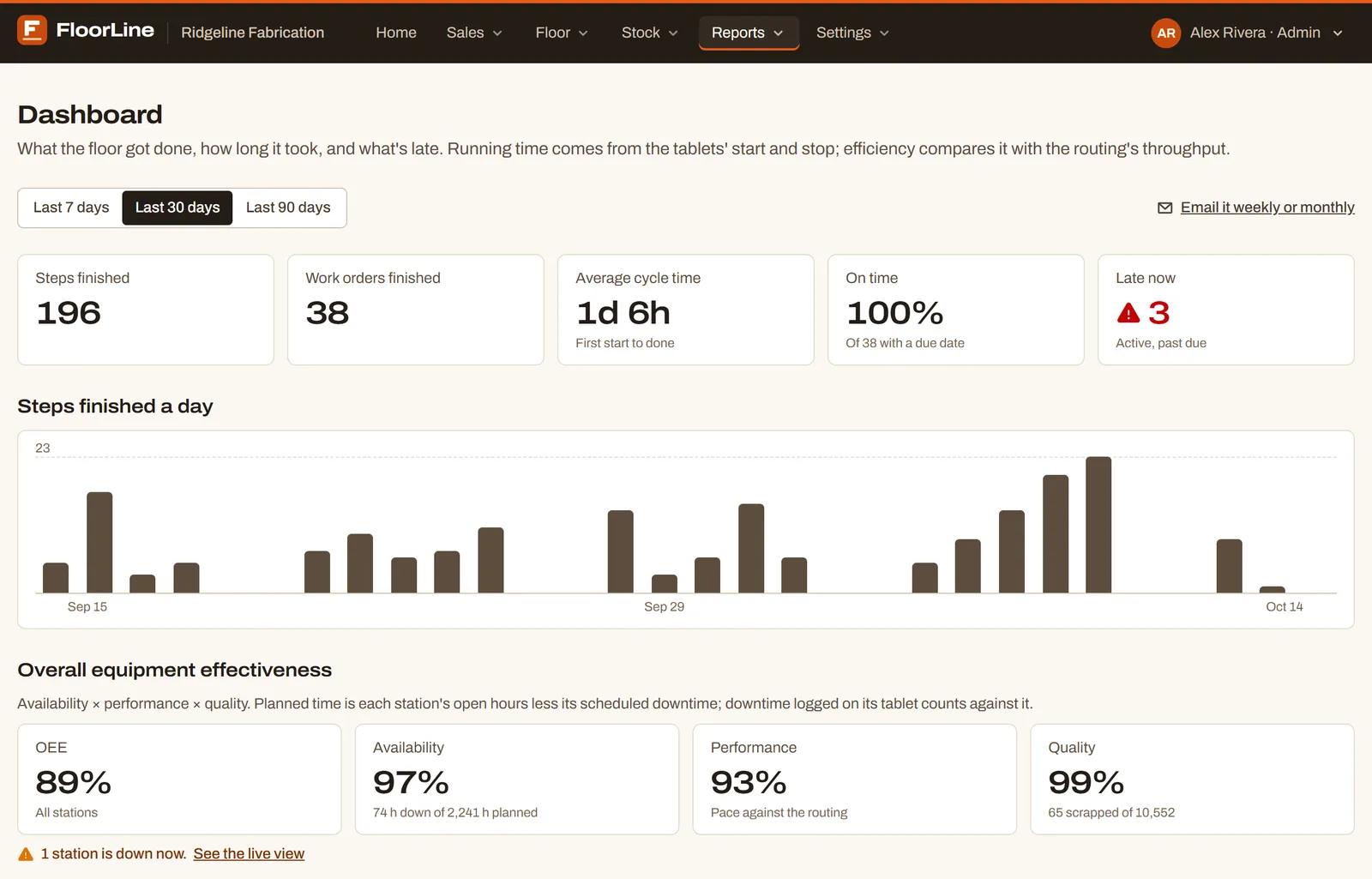
Cycle time, on-time rate, efficiency by station and operator, and OEE with downtime by reason, all from the taps your operators already make. A summary of the last workday lands in your inbox at 6 a.m.

  • Daily summary email (Basic)
  • Dashboard, OEE, and downtime by reason (Mid)
  • Weekly or monthly report emails (Mid)
FloorLine’s dashboard: steps and work orders finished, average cycle time, on-time rate, a chart of steps finished per day, and OEE

Sales orders

Customers check their own order

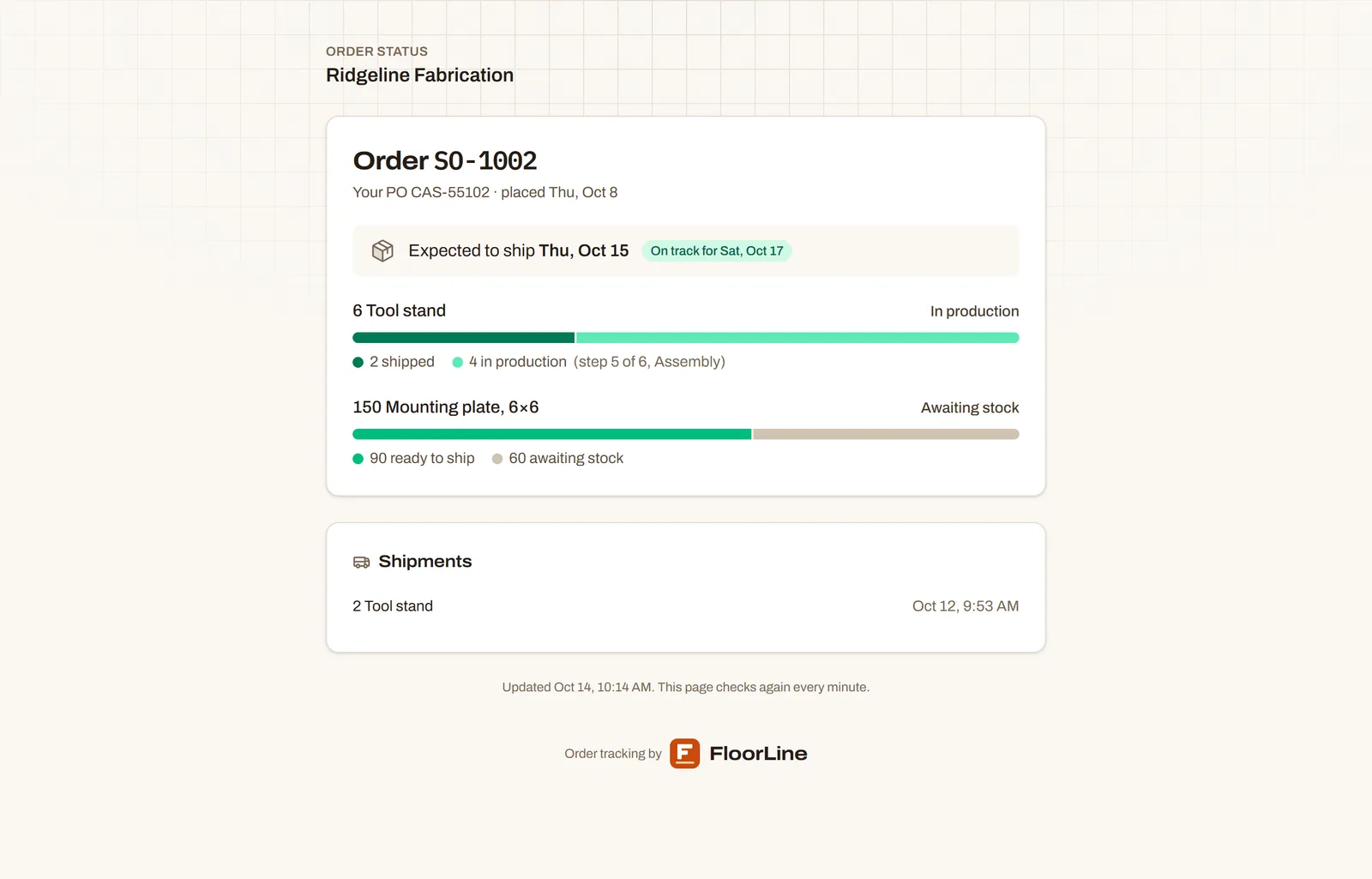
A sales order makes the work orders for what isn’t in stock. Send your customer a private link: they see each line’s progress and when it should ship, without prices, notes, or who’s working on it.

  • Sales orders and shipping (Basic)
  • Down through every level of the bill of materials (Mid)
  • Turn a link off whenever you like
A customer’s order status page: each item’s progress, what’s shipped, and the expected ship date

And around it

Everything else a small shop runs on

  • Barcode travelers

    A printable traveler for every work order, with a barcode for each step.

  • Shipping and receiving

    Purchase and delivery orders, received and shipped in parts.

  • Sales orders

    What a customer ordered, with the work it takes to make it.

  • Import from spreadsheets

    Items, routings, BOMs, stock, and open orders from templates.

  • Audit log

    Who changed what, and when, for every record.

  • Your own address

    Open FloorLine at floor.yourshop.com.

  • Several locations

    Stock by location and transfers between them (High).

  • Export anything

    Items, work orders, and stock history as CSV, on every plan.

  • A real help center

    Step-by-step guides with screenshots, and a card for operators.

How it works

Running the same day you sign up

  1. 1

    Add stations and items

    Type them in, or import them from spreadsheets.

  2. 2

    Print travelers

    Each work order gets a barcode traveler that rides with the job.

  3. 3

    Scan at each station

    Start, finish, or hold a step with a scan or a tap.

  4. 4

    Watch the board

    Supervisors and the office see where everything is, live.

Pricing

Priced per shop, not per seat

Every plan has the live floor board, travelers, scanning, and the floor app for tablets. Start with 14 days of Mid, free.

  • Free

    $0 forever

    3 users · 3 stations

  • Basic

    $39 / month

    10 users · 5 stations

  • Mid

    $99 / month

    50 users · 25 stations

  • High

    $249 / month

    250 users · unlimited stations

See plans, add-ons, and every feature

Trust and security

Your shop’s data stays your shop’s

Every shop is walled off from the others by the database itself, and passwords and PINs are never stored.

  • Encrypted in transit and at rest
  • Card payments handled by Stripe; we never see your card number
  • Export your data as CSV any time, on every plan
How we protect your data

Questions

What shops ask first

What do we need on the shop floor?
A tablet or computer at each station with a current web browser and Wi-Fi. FloorLine installs from the browser, and operators scan travelers with the tablet’s camera.
What happens when the Wi-Fi drops?
Whoever is signed in keeps working. The tablet saves starts, stops, completed steps, and holds, and sends them in order when the connection is back.
Do operators need an email address?
No. Operators tap their name on the station’s tablet and enter a 4 to 6 digit PIN. Only admins and managers sign in with an email and password.
Can we bring in our existing data?
On Mid and High, import vendors and customers, stations, items, routings, bills of materials, lots and serial numbers, and open work orders from spreadsheets, each with a template. Every plan can add them by hand.
How long does it take to set up?
Add your stations, an item with its routing, and one operator, and you can run your first job through a tablet the same day.

More in the help center.

Put your floor on a board this afternoon.

Add your stations, enter a work order, and hand a tablet to the first station. The 14-day trial has every Mid feature, with no card.